Conjure UI
Overview
Conjure UI is a kit of animated chat components for prototyping AI chat. A designer brands it in minutes and puts it together by prompting an AI.
I built it because I kept drawing the same chat screens in Figma for every client.
I’ve since decided to grow it beyond chat, to cover the common UX patterns I think fintech and merchant companies use.
- Impact area
- AI chat prototyping
- Focus
- Design system
- Design tokens and theming
- Motion
- AI assisted prototyping
- Automated testing
Build the chat once, then brand it for every client
Before and after
I used Claude Design to build two demos from the kit, to show the workflow end to end. Both are the same IGA grocery assistant chat, first as a grey wireframe, then in the brand.
Each demo is one self contained file that makes no outside requests. It loads only when opened, because the files are large.
Before
Wireframe
The IGA grocery assistant chat as a grey wireframe, with no brand.
Concept, not affiliated with IGA
After
Branded
The same assistant in the IGA brand, walking through a butter chicken recipe.
Concept, not affiliated with IGA

The problem
Every client wanted an AI chat, so I kept redrawing it in Figma
The reframe
Make the pieces real code, with the motion already in them
Rebuilding the bubbles, typing dots, cards and payment sheets each time in Figma slowed down rapid prototyping. That left no time or budget in Design Thinking workshops for clients to test their idea.
I wanted clients to talk to a chatbot and check the conversational tone and user flow they had in mind. They could also critique their own ideas, discuss them with one another and refine them before passing them to my team to improve further.
Another option is to invite users to the workshop, so clients can test their ideas with them. Motion design also brings a kind of interaction testing that Figma can’t fully give.
- Message bubbles
- Typing dots
- Cards
- Quick replies
- Payment sheets

How it is built
Small parts build bigger parts,
and no component holds a colour of its own
Atomic design
The kit follows atomic design, where small parts build bigger parts.
Atoms
The smallest pieces
Count 20folders
- In the repo
primitives- Examples
- Status badge, price, typing dot skeleton, quantity stepper
Molecules
Atoms put together into one useful card
Count 25
- In the repo
core- Examples
- Message bubble, chat input, quick replies, slot picker, cart summary, payment sheet
Organisms
Whole screen shells with named slots to fill
Count 3
- In the repo
layouts- Examples
- Chat widget, modal sheet, delivery tracker
Motion
The components animate with the Motion library. The motion is built in, so a designer never has to animate a message arriving or a sheet sliding up again.
One client brand
No component holds a colour. Every colour, corner and shadow is a named value, a design token, that a theme can swap.
The tokens a full rebrand changes
- Font
- Background
- Text colour
- Main colour
- Text on the main colour
- Corner radius
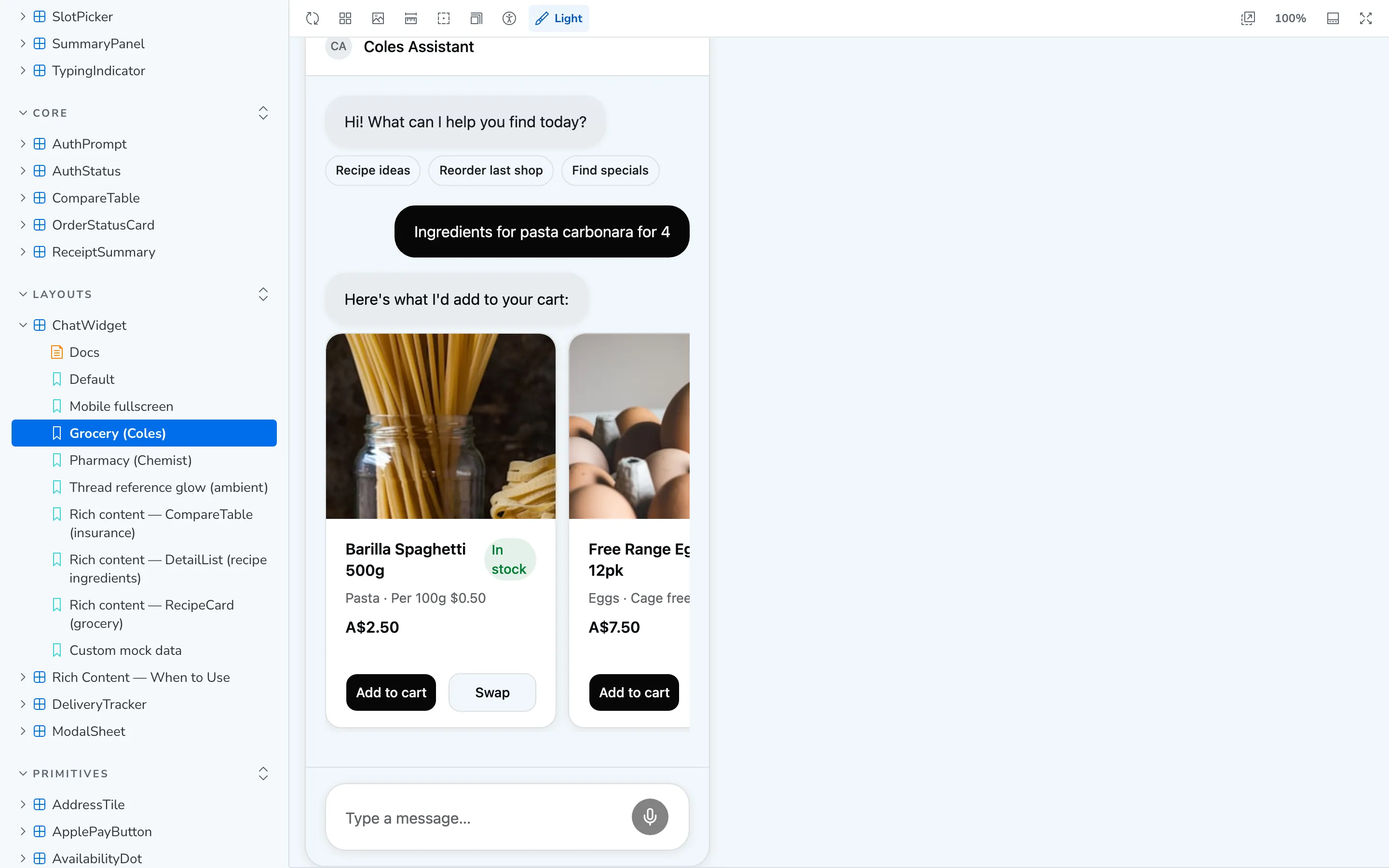
Storybook (opens in a new tab) carries example brands for travel, retail, healthcare, a chemist and Coles, as demos that don’t ship in the kit. A wireframe mode turns everything grey and square, for testing a flow before a client has a brand. A separate theme can then switch it to high fidelity, with a design system encoded from the client’s brand.

The workflow
The kit works with whichever
AI agent a designer already likes
Designer workflow
Four steps take a designer from an empty project to a branded chat flow, in Claude Design, Claude Code, Codex, Cursor, Replit, Lovable or another agent.
Add the kit
The designer pastes a ready made prompt into the AI agent, which installs the kit and wires it up. A tool that runs in the browser and can't install code packages copies in only the pieces it needs.
Pull the brand
The AI reads the client's live website and finds their colours and font.
Map the brand
The AI writes those into one theme class. It never edits a component.
Build the flow
The designer describes the chat, for example “the user asks for a delivery slot, then pays with Apple Pay”, and the AI puts the pieces together.
At a global payments company
When a company hasn’t approved an AI tool, the kit still works with the tools it allows.
I worked with a developer at a global payments company. She used the kit to build an AI prototyping tool for designers there.
At the time, Claude Design was not yet approved for use inside the company, so its designers couldn’t use it. Her tool gave them a way to prototype AI chats with the kit anyway.
The outcome
Every story renders in a real browser
How I know it works
Each check proves a different thing about the kit.
- Every story renders in a real browser, with Vitest and Playwright
- No component is broken
- 19 interaction tests
- The behaviour works, for example keyboard use and focus staying inside a pop up
- Chromatic screenshots of every story
- A change to one token can't quietly restyle everything
- An install test in a clean folder, outside the repo
- A stranger can install and use the kit
The kit in numbers
- Components
- 48Across three levels
- Animated
- 28Components with motion built in
- New brand
- 6Settings to change: font, colours and corner shape
- Demo brands
- 5Plus wireframe mode
- Storybook
- 287Stories
See the kit
The live components are in Storybook, and the code is on GitHub. Next, I'm expanding the kit past chat, into the common UX patterns I think fintech and merchant companies use.