AP+ Testing Portal
Overview
The AP+ Testing Portal is a B2B self-service platform where Australian Payments Plus manages large-scale payment product certification. AP+ testers set up and assign test cases across multiple banks and merchants.
Those organisations then certify against AP+ payment product APIs.
- Role
- Sole designer
- Impact area
- Payments and financial infrastructure
- Focus
- User Experience
- User Interface Design
- User Feedback
- Design System
- Figma MCP Server
- QA and usability testing
Streamlining regulatory certification for Australia’s payment ecosystem


The problem
AP+ certification ran on
spreadsheets and manual
coordination
The reframe
Scaling certification into a self-service platform
AP+ testers built and assigned the test cases for every bank, fintech and merchant by hand. Members then certified against them the same way, on spreadsheets and manual coordination.
Participants had no visibility into progress, and testers had no structured way to track attestations, exceptions or feedback. The result was integration delays and rising operational costs.
I was hired as a contractor to deliver phase 2, which had to scale this into a self-service platform. It needed to carry certification workflows that run over many steps, and meet Reserve Bank of Australia compliance standards.
“I need to know exactly where every member is in certification, without hunting through five spreadsheets.”
Success criteria
Six targets set for the work, not results it reported.
- Certification efficiency
- 20–30%The target: less manual effort for AP+ testers
- Task completion
- 78%+The target for attestations, exceptions and reviews, without friction points or needing to contact AP+ for help
- Drop off
- <20%No single workflow step was to lose more
- Template accuracy
- AP+ testers had to be able to configure templates with the right business logic, with no misconfiguration reaching a participant
- Workflow clarity
- Users had to understand their status, their next step and their dependencies at every stage
- Compliance readiness
- Workflows had to meet Reserve Bank of Australia certification standards before go live

The approach
Landscape review
Personas
User journey
Information architecture
Landscape review
Tool
Test execution and onboarding
Sauce Labs
What worked
- Setup opens on one question, 'What would you like to do?', and the testing type chosen sets the whole path
- Quickstart cards name the framework and the languages it takes, so the fit is readable without opening anything
- A Get Started Checklist stays on screen and ticks steps off, so progress through setup is always visible
The friction we noted
- Navigation runs product areas, system settings and usage together in one long list of collapsed groups
- The page is all setup, so nothing on it reports the state of work already running
What we adopted
- One numbered spine of steps and tasks, so a tester folds away what is settled and keeps the open branch in view
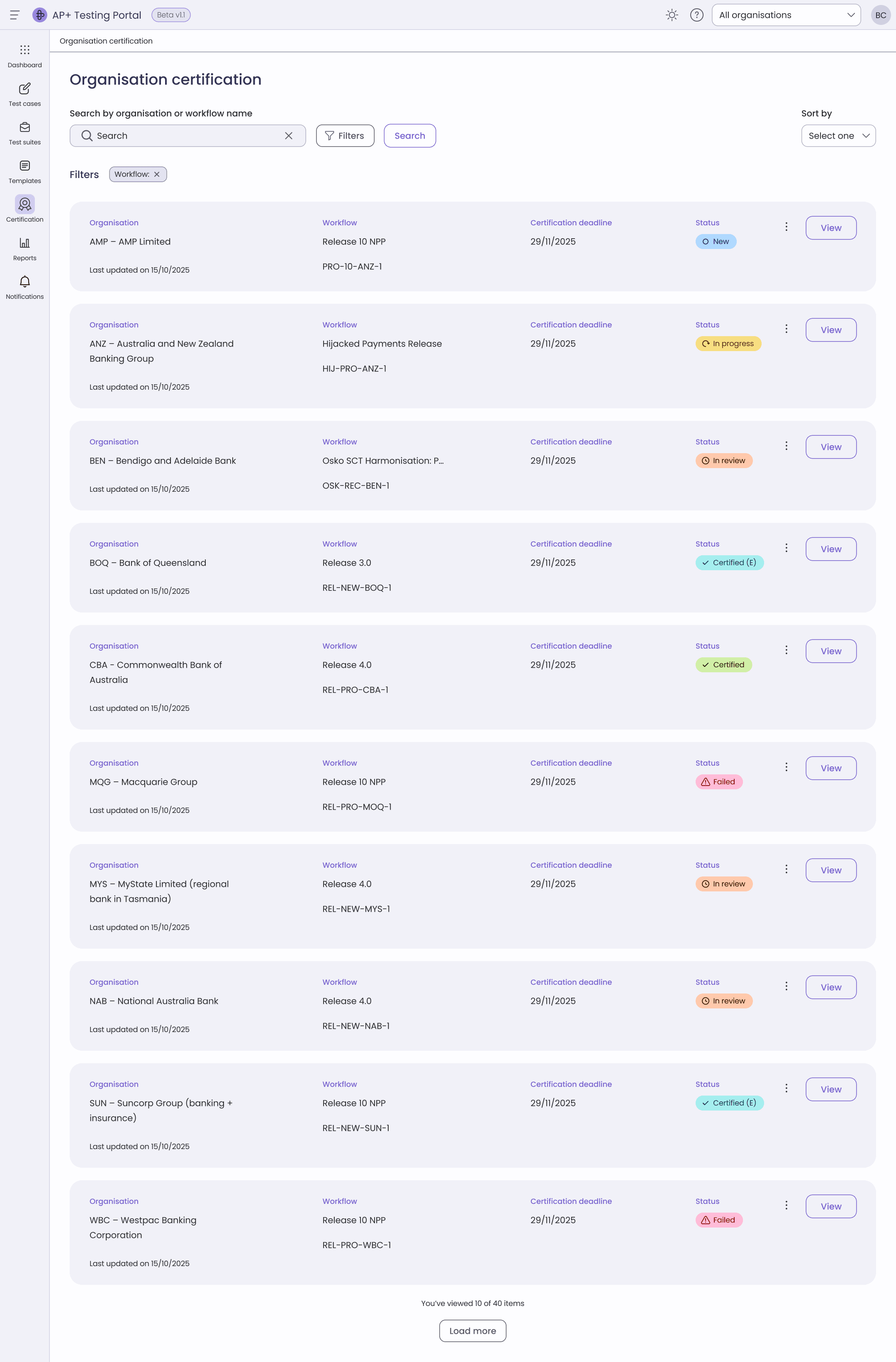
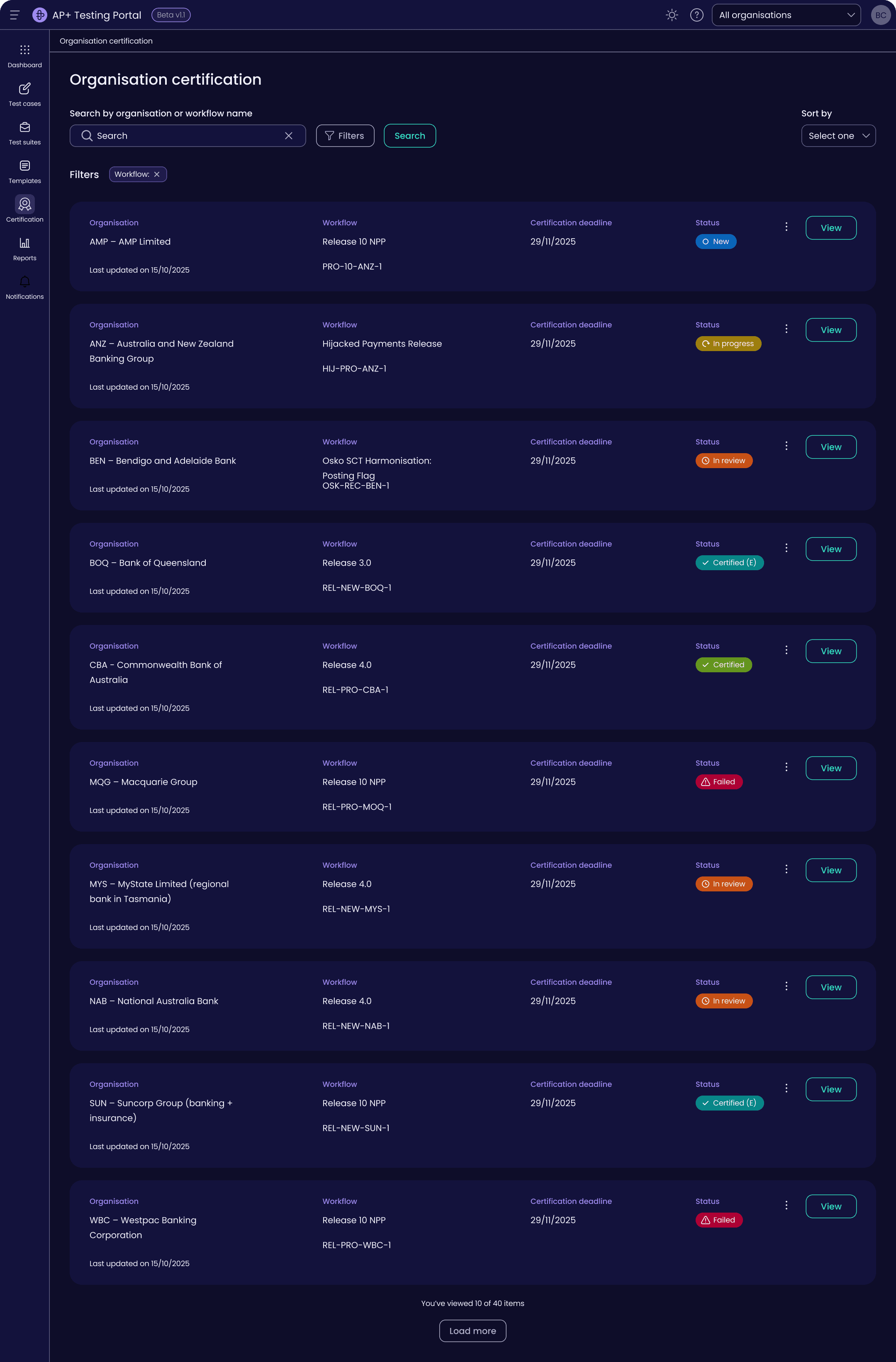
- Status on every row of the organisation list, so a member reads where they are without opening a record
Test case management and test runs
BrowserStack
What worked
- A run leads with its own progress bar, pass state and test count, so its status reads at a glance
- The case detail opens beside the list rather than on its own page, so the run stays in view while a case is read
- Results and Defects are tabs on the case itself, so the evidence stays with the record
The friction we noted
- The list holds four columns and truncates the title, so scanning a large run means opening records one at a time
- Status is changed from a small control inside the detail panel, away from the list where the run is read
- Description, preconditions and attachments sit empty at '--', so an unfilled case still presents as a finished one
What we adopted
- Attestations, exceptions and evidence sit on the task they belong to, so a tester acts on the row in front of them
- Approve, reject and refer back are inline on the record, each carrying its comment
- A refer back keeps the change history beside the record, so both sides see every revision
Personas
Internal user
AP+ tester
An internal AP+ employee responsible for managing certification workflows, reviewing member submissions, and making sure compliance standards are met across banks, fintechs and merchants.
A high volume of concurrent certifications, worked across several member organisations at once under strict regulatory requirements.
“I need to know exactly where every member is in certification, without hunting through five spreadsheets.”
Goals
- Create and manage certification workflow templates efficiently
- Review attestations and exceptions across member organisations
- Maintain audit trails for regulatory compliance (RBA standards)
- Reduce time spent on manual tracking and communication
Frustrations
- Tracking attestation and exception status across spreadsheets
- No centralised view of member progress or feedback history
- Inconsistent review actions between different testers
- Losing context when switching between member submissions
Needs
- A centralised dashboard for workflow oversight
- Inline approve, reject and refer back controls, each with a mandatory comment
- Template management with reusable steps and test case linkages
- A clear distinction between blocking errors and warnings
User journey
Stage
Initial contact
Member / external
A new participant expresses interest in integrating with an AP+ product. An existing one wants to recertify when NPP updates land, and new scheme mandates trigger recertification.
AP+ internal
Account Centre: an AP+ admin sets up access so external users can log in to the Test Automation Portal.
Test case creation and configuration
Member / external
Test case browse: external users see the in review and active test cases written by AP+ testers, and the certifications assigned to them.
AP+ internal
The NPP Test and Cert squad create test cases with basic details. A business analyst reviews them for release. The Testing Sub Working Group handles queries.
System
The Test Automation Portal lists test cases and test suites, and takes the input of test case details. The back end defines what a member can view.
The portal does not run test case steps automatically.
Data setup and environment selection
Member / external
External users set up any required test data and select the environment to run the tests against, such as sandbox or staging.
AP+ internal
Communication with external users through the Testing Sub Working Group to answer questions on test cases: they review in their own time and email queries to the team.
Certification and test execution
Member / external
Formal or informal test execution, under a certification workflow or standalone. Manual verification by reviewing log files. Some steps run offline, outside the emulator and test bank.
AP+ internal
Foundation: AP+ testers own test case management, defining message types, building test cases and executing scenario based validation.
Certification: execute the certification workflow including its test cases. Individual test case: immediate ad hoc validation of a single message.
System
- Message type CRUD
- Log ingestion
- Message type schema validation
- Message grouping
- Message type business validation
- Test case validation (flow)
Information architecture
Organisation certification
- Shipped
- Future build
- Export
- Decision
Organisation workflow
Single workflow
Single participant
Workflow details with execution status
Export Test Cases (.csv)
Export Workflow (CAMG-like)
Context with progress status
Attestations of test cases
Exceptions (test cases)
Approve / Reject / Refer
Certified or certified with exemptions
Or referred back or failed
Future build
Designed, not built.
branches fromWorkflow details with execution status
Test cases
A step
x no. of message types + criteria
x no. of message types
rejoinsCertified or certified with exemptions

Key design decisions
A centralised review interface with attestations, exceptions, and evidence in one view.
Nested steps
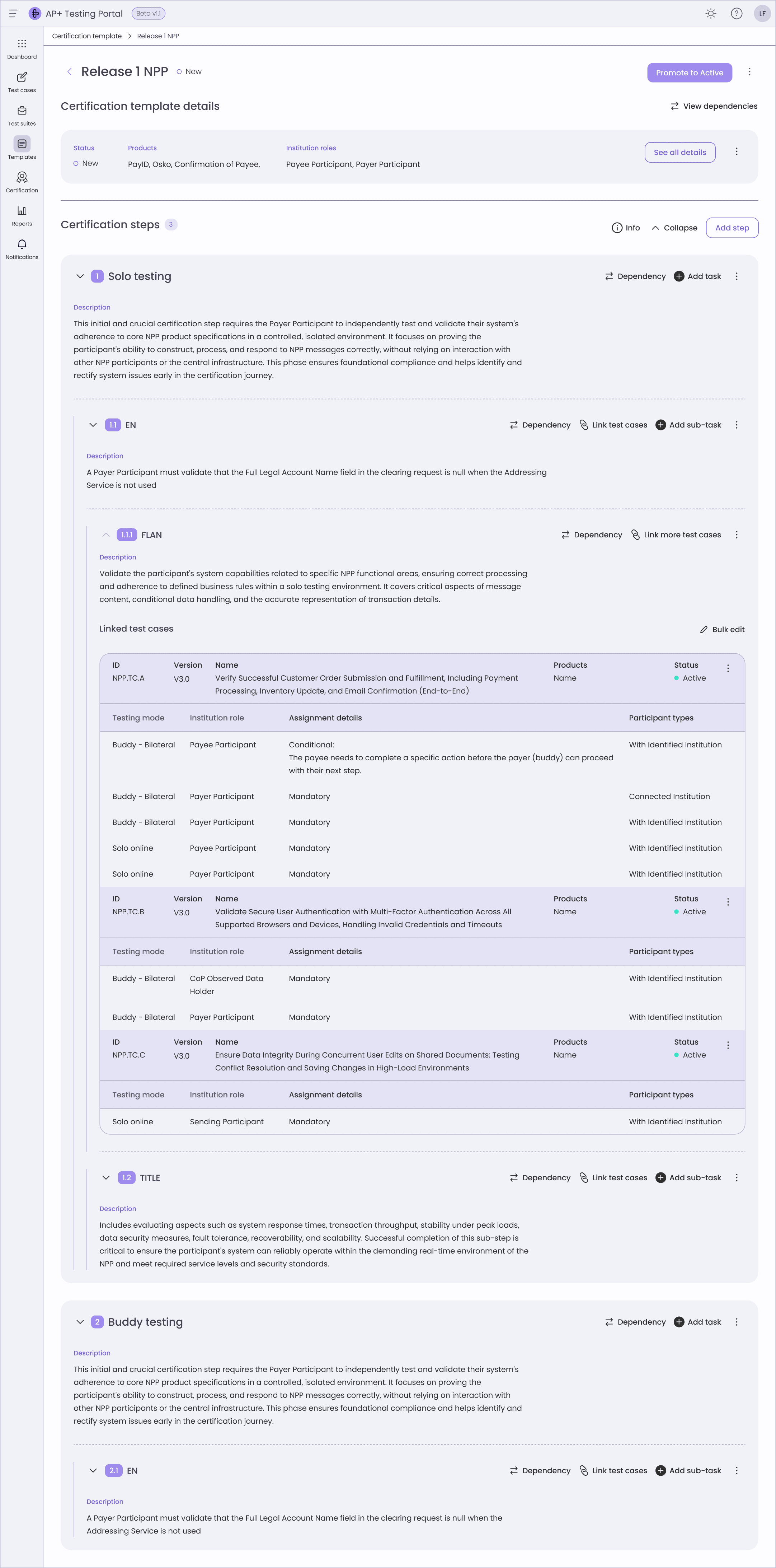
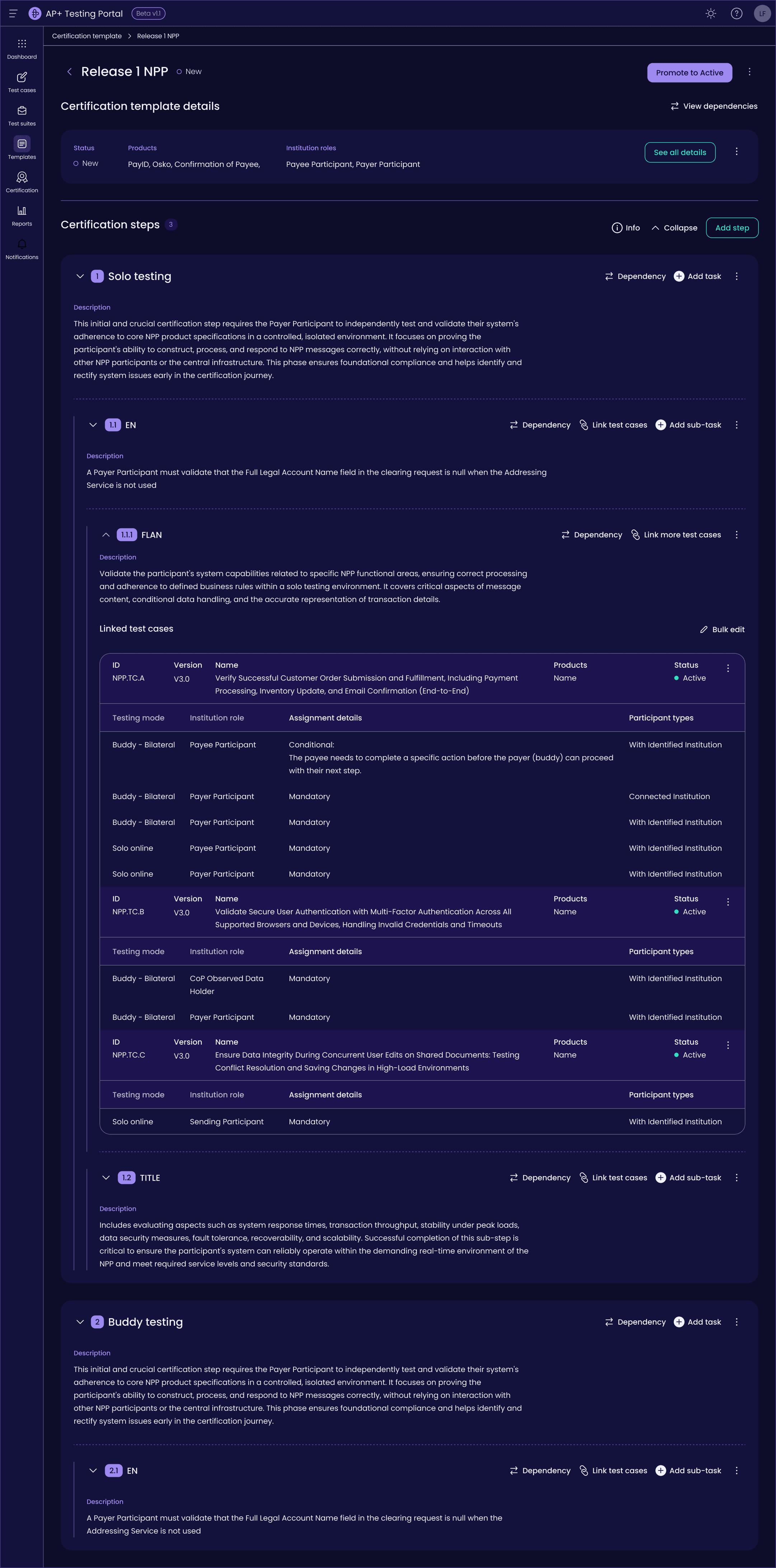
A certification template runs deep. Steps hold tasks, and each task carries its own test case links and dependencies.
I made every level collapsible, so a tester can fold away what is settled and keep the branch they are working on in view. The numbering carries position rather than the label: a step reads 1, its children read 1.1 and 1.1.1, so any row can be referred to without describing the path to it.
Naming was the harder half. A parent is always a step and its children are always tasks. A tester reading a button knows which level it acts on before pressing it.
Collapsed
Each step folded to one row
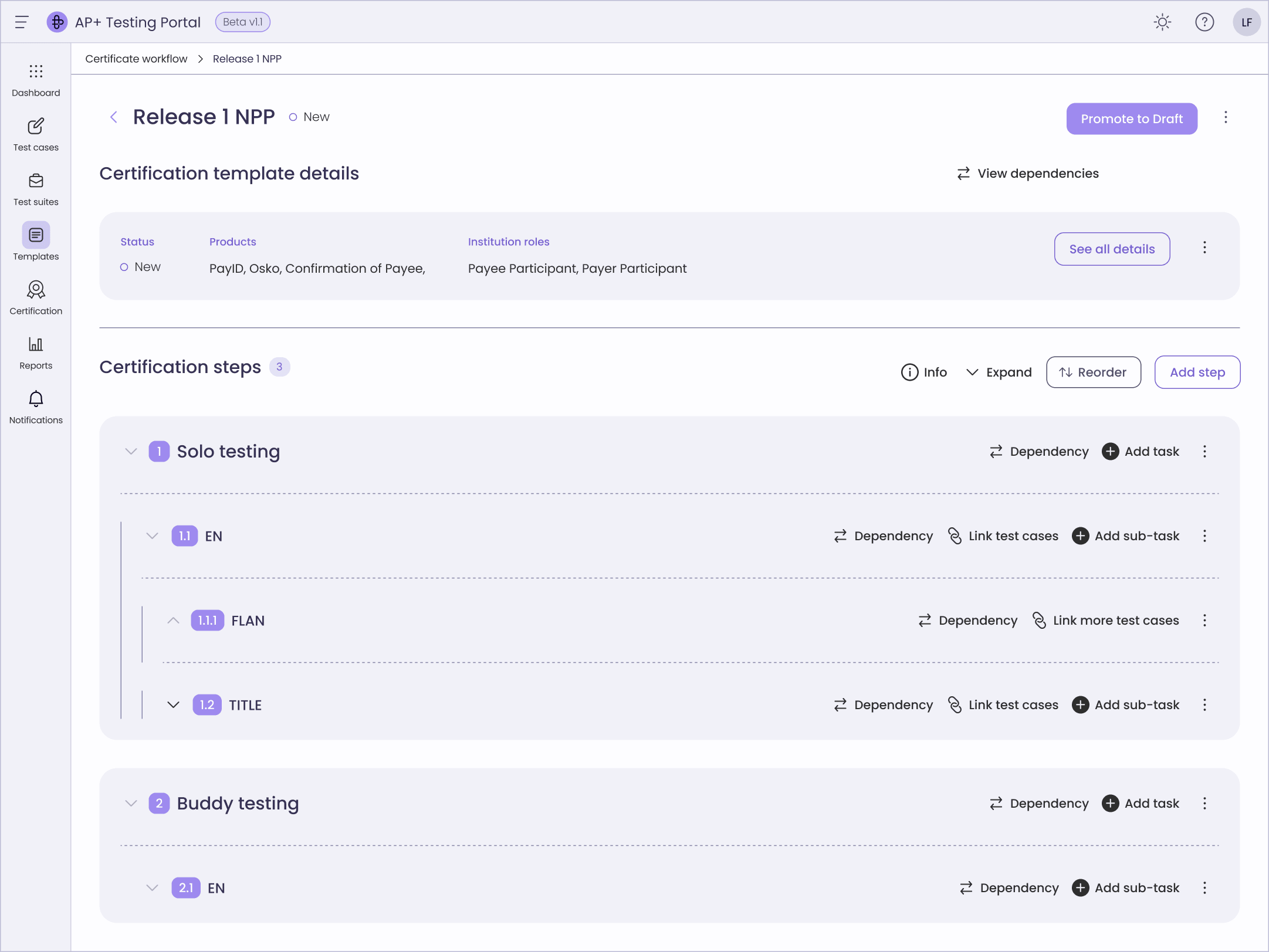
- The certification workflow builder with its steps collapsed, so each numbered step reads as one row.
- The same template expanded, showing each step's tasks and each task's linked test cases and dependencies.
One review view
No single view of milestones, evidence or exceptions.
Every task now carries its own attestations, exceptions and evidence, so a tester acts on the row in front of them instead of moving to another screen.
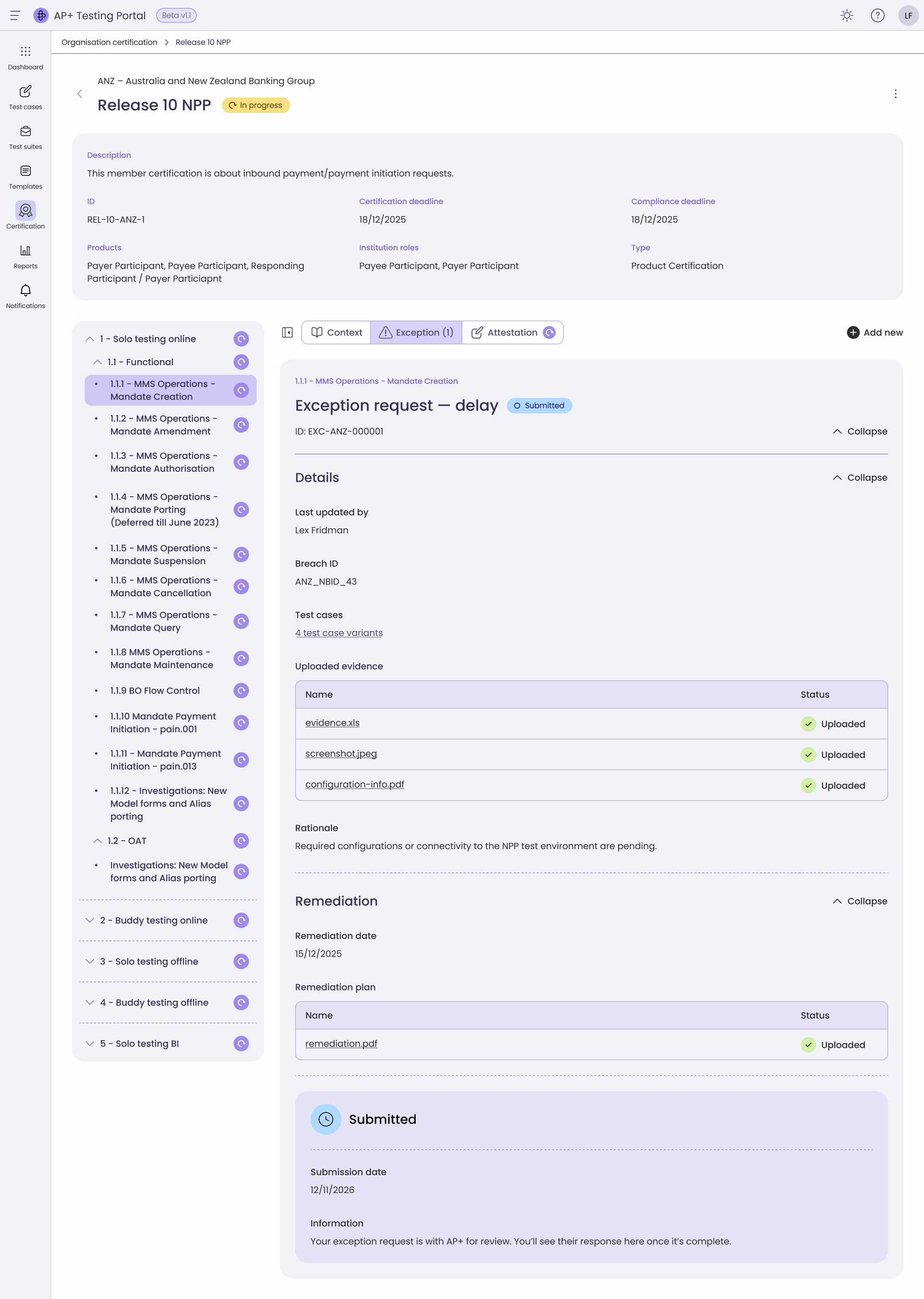
- A submitted exception in the AP+ Testing Portal, with its type, breach ID, evidence and rationale held beside the test case it was raised against.
Visible history
Little visibility of a member's progress or history.
A refer back lets members revise without losing the version history, so comments, status and evidence stay visible to both sides.
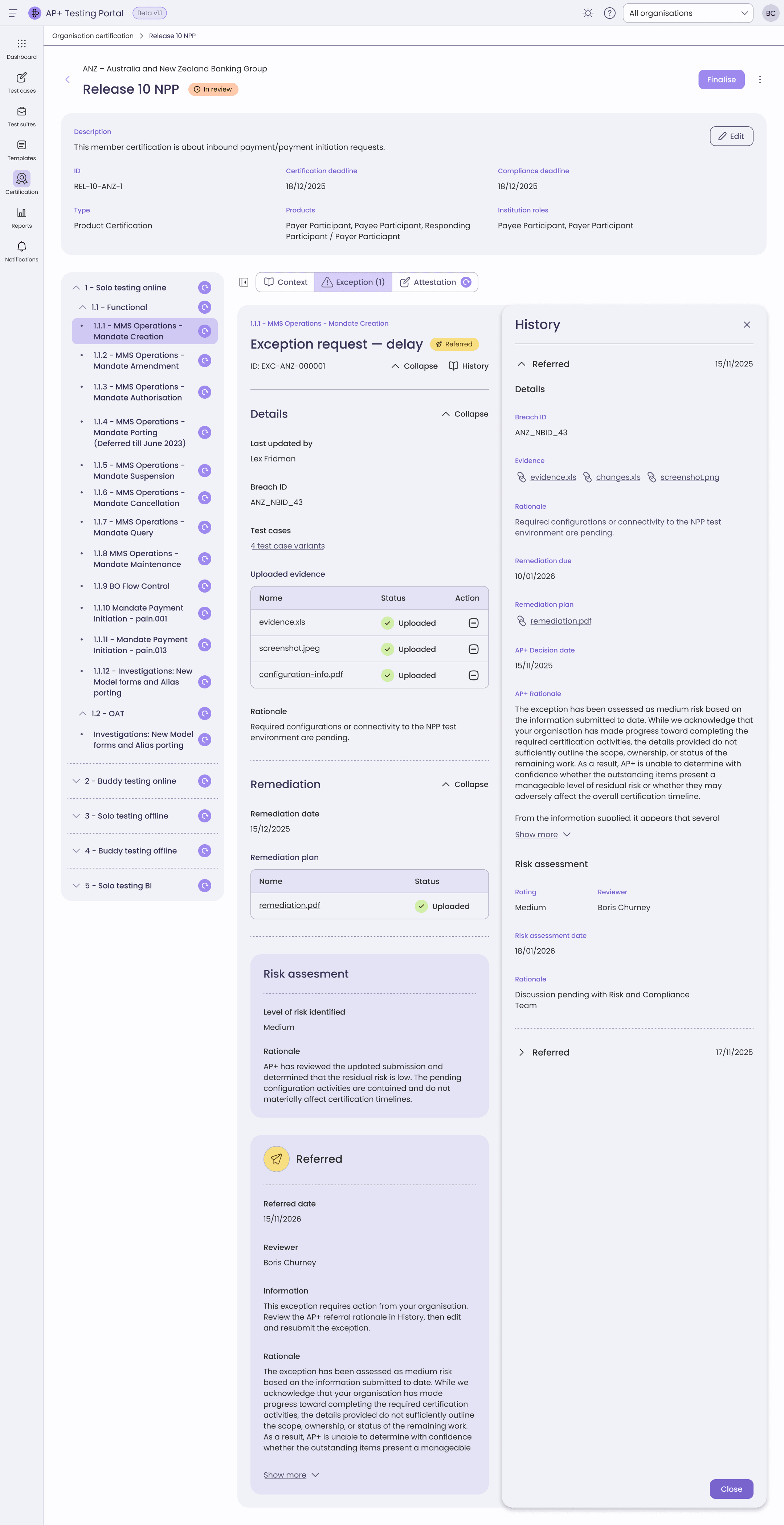
- The change history of an exception opened alongside the record, showing every revision and comment in order.

The outcome
Design System
Figma design to code
Game Changer Award
Design to code
- Figma to code
- Refined and improved a Figma to code process using the Figma MCP server.Learn more on my Substack
- Design system
- Standardised tokens and design system best practices, reference component and UI patterns in React Aria, to enable smooth handover.
- Token naming
- Collaborated with a Frontend Engineer to establish design token naming conventions between Figma tokens and CSS custom properties, making AI assisted development more reliable and reducing technical debt.
- AI code generation
- Worked with a Frontend Engineer to develop instruction files and prompt libraries that encoded design system principles for AI code generation.
- AI enabled workflows
- Created a custom OpenAI UX QA agent that produces reports from manual testing. Playwright runs in the codebase against the acceptance criteria, with AI optimised specifications driving the work.
Achievements
- Game Changer Award
- Recognised with the Portal Squad at the internal Game Changer Awards for shipping two major releases, the AP+ Testing Portal and the first AP+ Member Portal, celebrated with collaborators across design, engineering and product.
- Handover
- Delivered production ready Figma files, ensuring a smooth handover to frontend engineers.
- Practice sharing
- Demonstrated best practice and systems thinking to designers and frontend engineers to improve these workflows, from Dev Mode through to instructing an AI model.